PocketTax: Solving the Solopreneur’s Tax Gap
An AI-powered B2B2C platform designed to transform Canadian tax compliance from a yearly crisis into a seamless, year-round mobile habit.
Project overview
Scope:
Product Design, UX Design, UX Research
Tools:
Google AI Studio, Gemini, Canva
Problem:
Canadian sole proprietors struggle with tax anxiety and "administrative trap" due to complex CRA requirements and the high cost of professional help.
Solution:
PocketTax is an AI-powered B2B2C platform that automates record-keeping via mobile capture and creates a seamless, white-labeled bridge between solopreneurs and expert accountants.

The Problem: The "Admin-Trap" for Canadian Solopreneurs
Most Canadian sole proprietors start their journey to pursue a craft, not to become tax experts. However, the moment a business launches, the owner is legally transformed into a tax collector (GST/HST), a benefit administrator (CPP), and a record-keeper for the CRA.
Why This Problem Matters
This isn't just an individual struggle; it is a significant economic friction point in Canada.
The Literacy Gap: A 2024 study by Xero revealed that 43% of Canadian small business owners actively face fiscal challenges due to a lack of financial literacy, with 28% specifically citing "optimizing tax strategies" as their biggest hurdle.
The Survival Risk: According to Statistics Canada and industry research, poor financial management (including cash flow and tax debt) is a leading cause of failure, contributing to the reality that roughly 20% of small businesses fail within their first year.
The "Shadow" Debt: The CRA’s 2022 Tax Gap Report estimated that the personal income tax gap (uncollected or misreported tax) is roughly $11.7 billion. This isn't just "evasion"—it's often "accidental non-compliance" from solo-operators who simply don't understand their obligations until it's too late.
The "So What?"
Solving this problem is critical because solo proprietors shouldn't have to choose between growing their business and staying compliant.
By bridging the gap between their daily operation and the professional oversight of an accountant, we aren't just building an app; we are building a safety net that prevents Canadian entrepreneurs from falling into tax debt or business failure due to a lack of specialized knowledge.
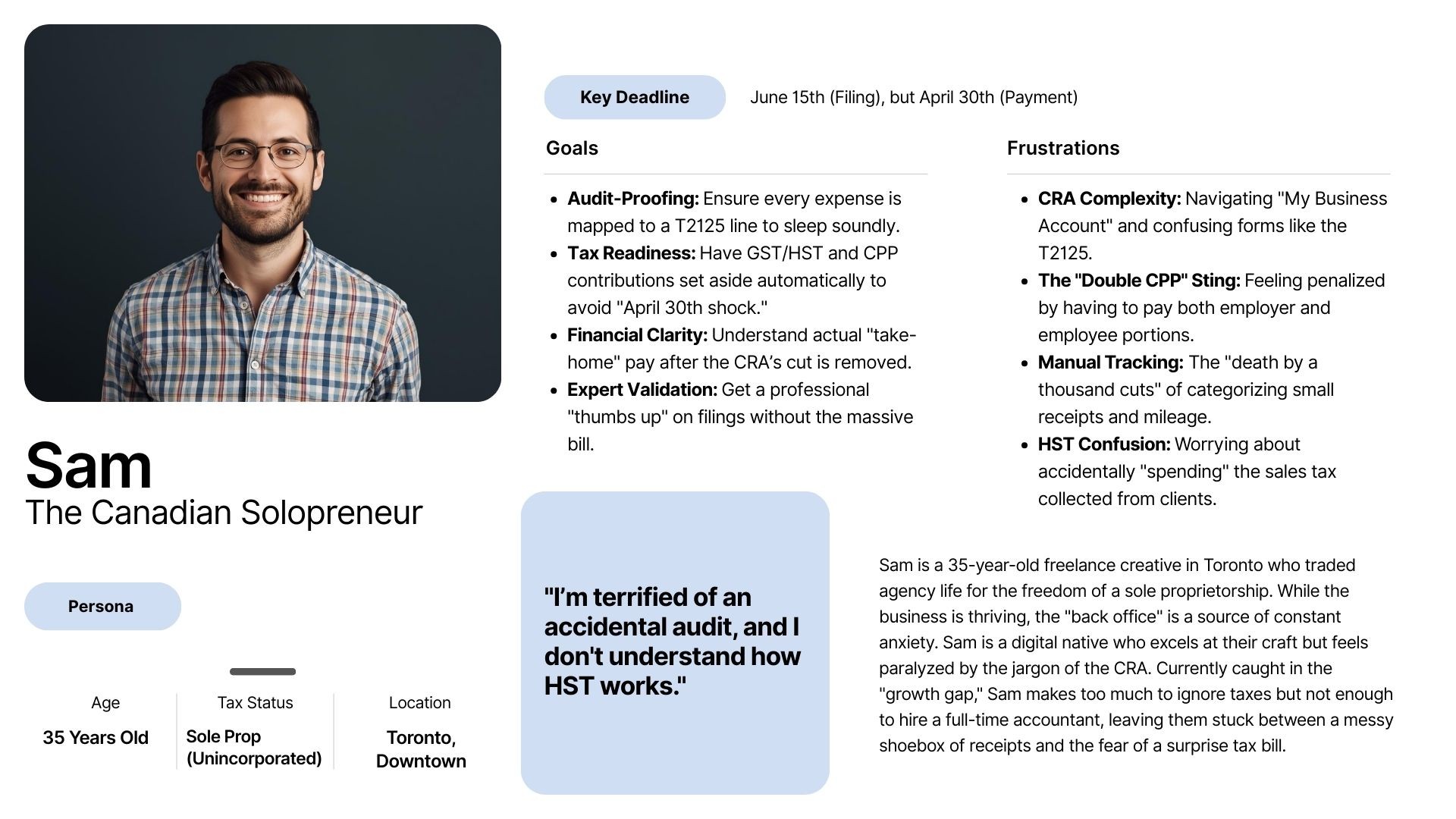
User Persona: The "Accidental Accountant"
For someone like Sam —who lacks formal financial training—this creates a "Growth Paradox": the more successful their business becomes, the more they are punished with administrative complexity they can neither manage nor afford to outsource.
User Journey Mapping
By mapping the before and after journey, it is clear that this solution solves three specific failures in the Canadian market:
Financial Literacy: The AI translates "CRA-speak" into Sam's language.
Cash Flow Management: The "Tax Vault" prevents Sam from spending money that belongs to the government.
Cost of Expertise: The platform provides "Accounting Lite" throughout the year, making the final human expert review faster and more affordable.
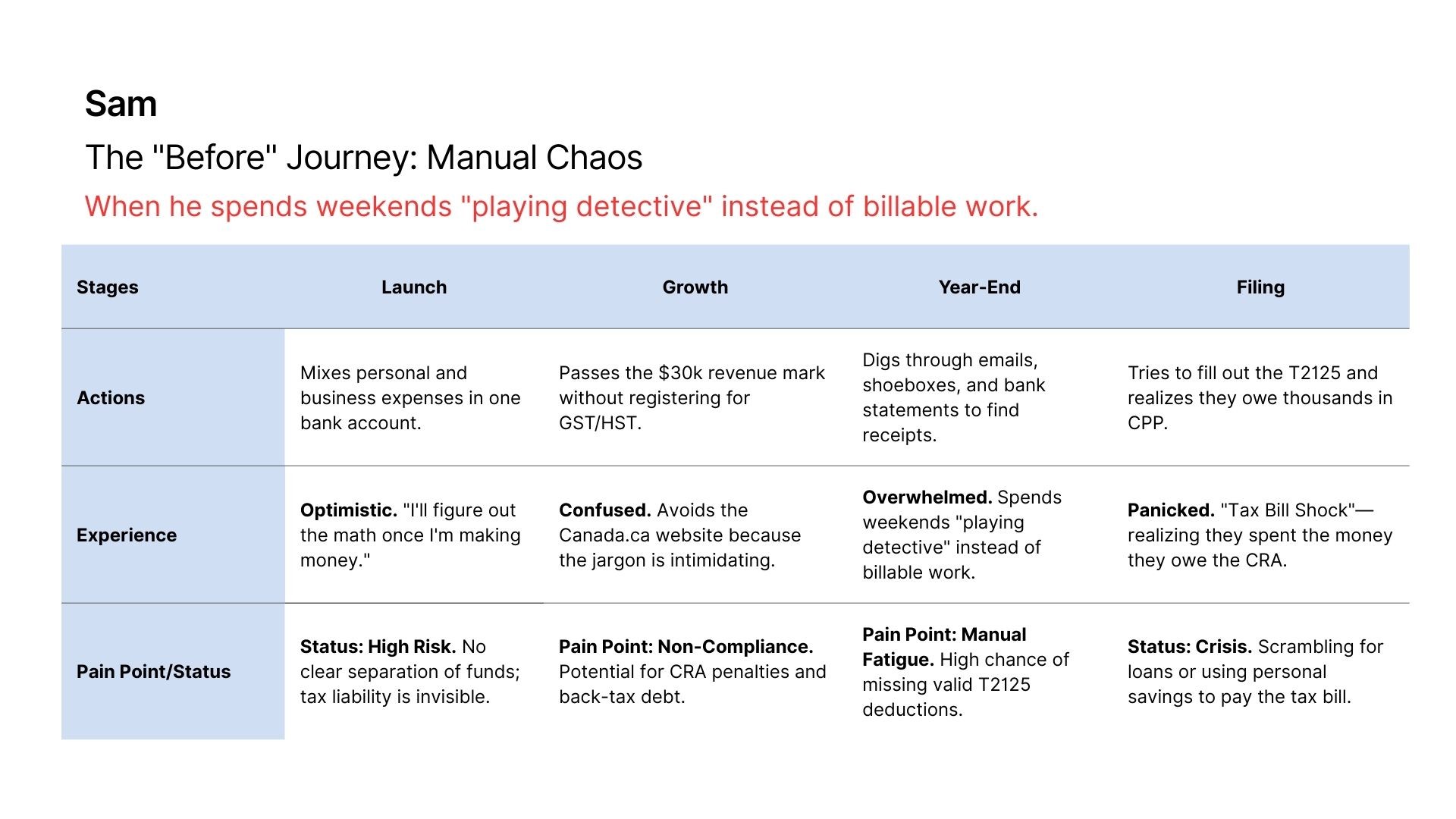
The Problem: Shoebox Document Vault
This represents the current state for most Canadian sole proprietors like Sam.
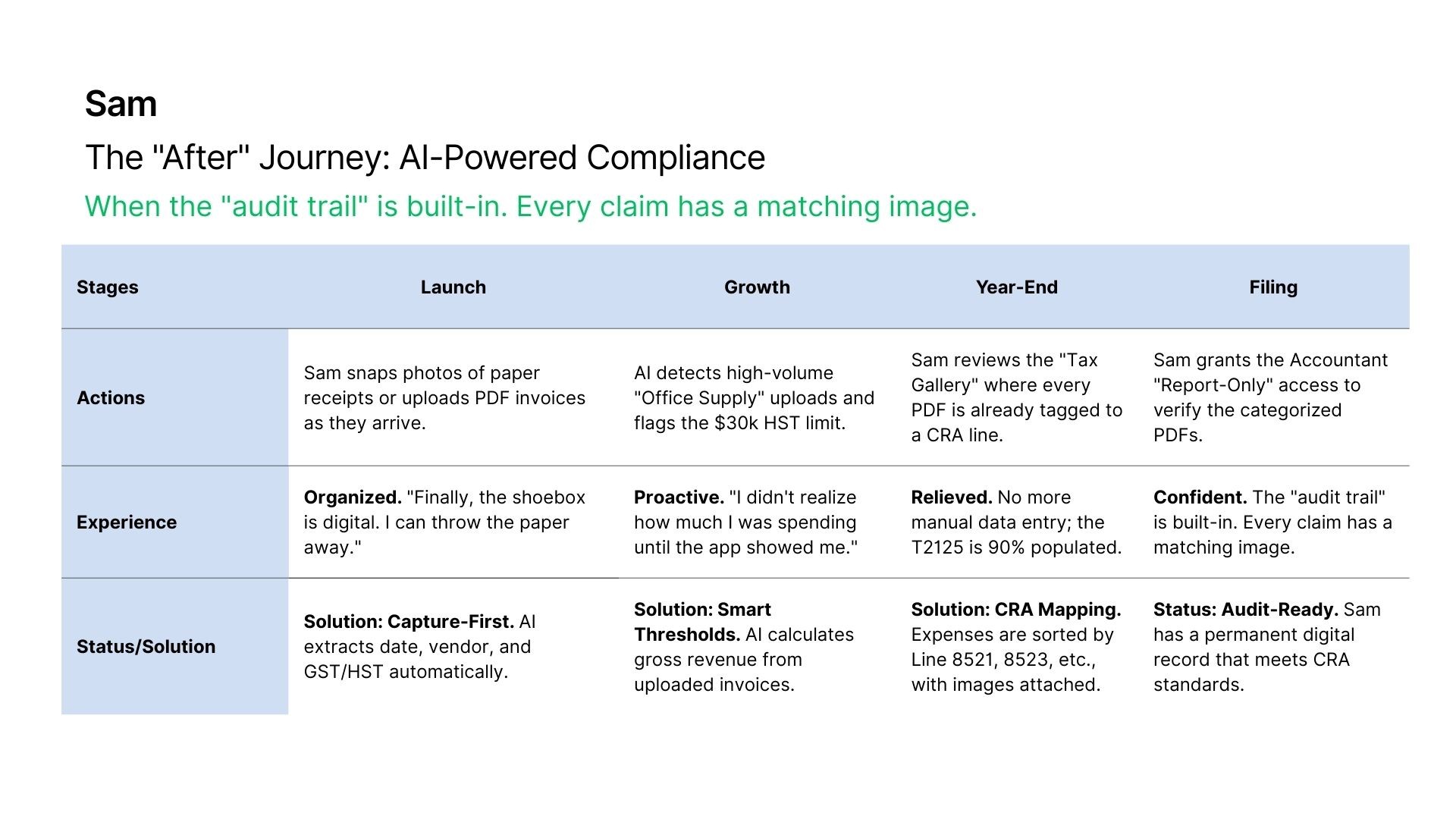
The Solution: AI-Powered Document Vault
This journey focuses on active capture and AI-assisted T2125 mapping.
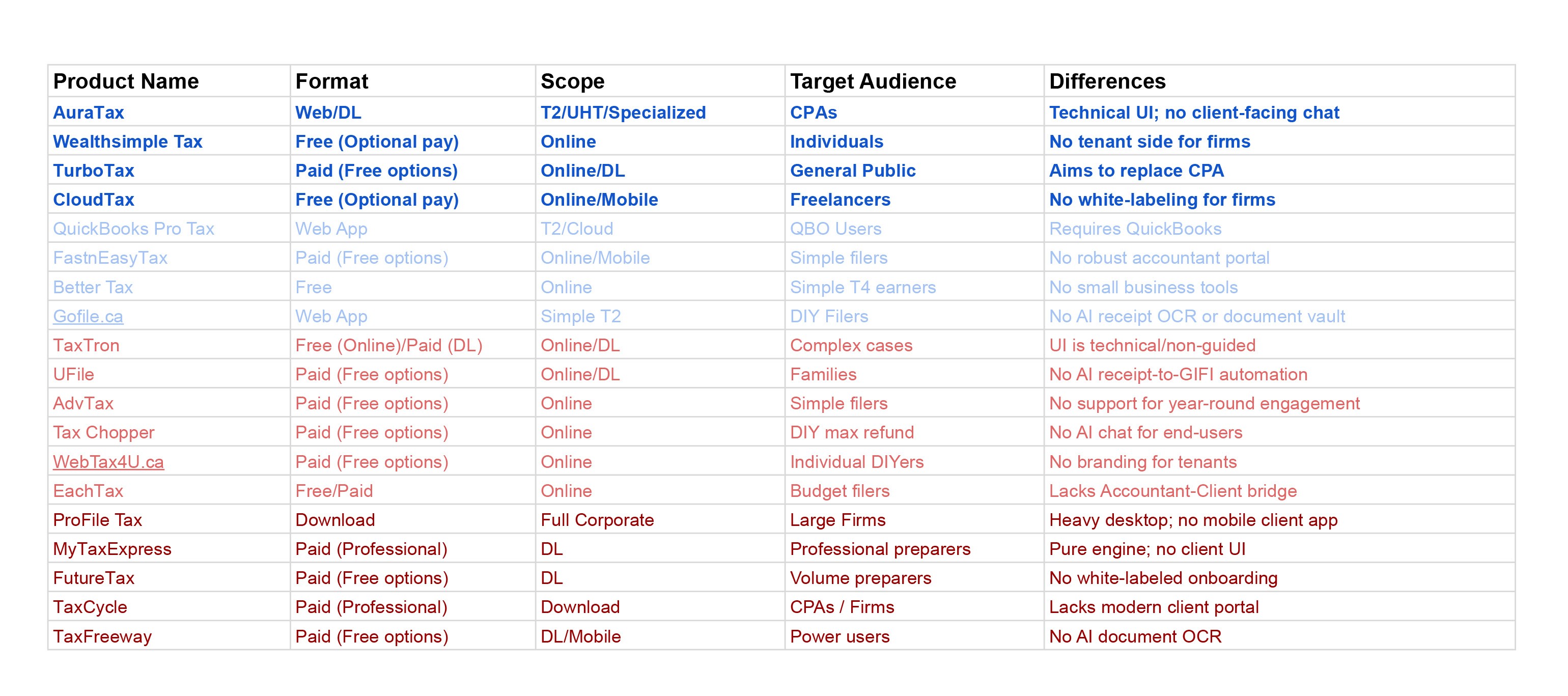
Competitive Analysis: Bridging the Gap in Canadian Tax Tech
The Canadian tax landscape is crowded with legacy software and DIY tools, yet a significant gap remains for the modern solopreneur. While industry staples provide the necessary CRA certifications (NETFILE/EFILE) and Auto-Fill My Return (AFR) capabilities, they often fail to address the year-round administrative burden faced by solo proprietors. Existing professional portals are frequently described as "clunky" and lack mobile optimization, while DIY tools often aim to replace the accountant entirely rather than facilitate a partnership.
Value Proposition
B2B2C White-Label Model: Unlike standard SaaS, this app is a bridge where the accounting firm (the Tenant) buys the software to provide a professional, branded experience to their clients (the End-Users).
AI-First Extraction: Beyond basic OCR, the AI contextualizes data (e.g., distinguishing a meal from travel) to flag specific GST Input Tax Credits (ITCs).
Year-Round Engagement: This isn't a "once-a-year" tool. It is a monthly habit for receipt snapping and mileage tracking, turning the year-end "panic phase" into a non-event.
Prototype Strategy: Solving Solo-P Side First
To build this three-sided ecosystem effectively, my design strategy focused on the Solopreneur (Solo-P) user experience first. By solving the daily "paperwork friction" for the end-user through mobile-first receipt snapping and mileage tracking, we ensure high-quality data flows seamlessly to the Accounting Tenant and the SaaS Provider. This user-centric foundation ensures that the "Year-End" becomes a non-event for the client, the firm, and the provider alike.
The Designer as Architect in the Age of AI
The information architecture (IA) was designed to bridge the gap between Sam’s daily workflow and the strict reporting requirements of the CRA. It is structured into two temporal buckets (Past and Future) to prevent "data pollution" and ensure audit readiness.
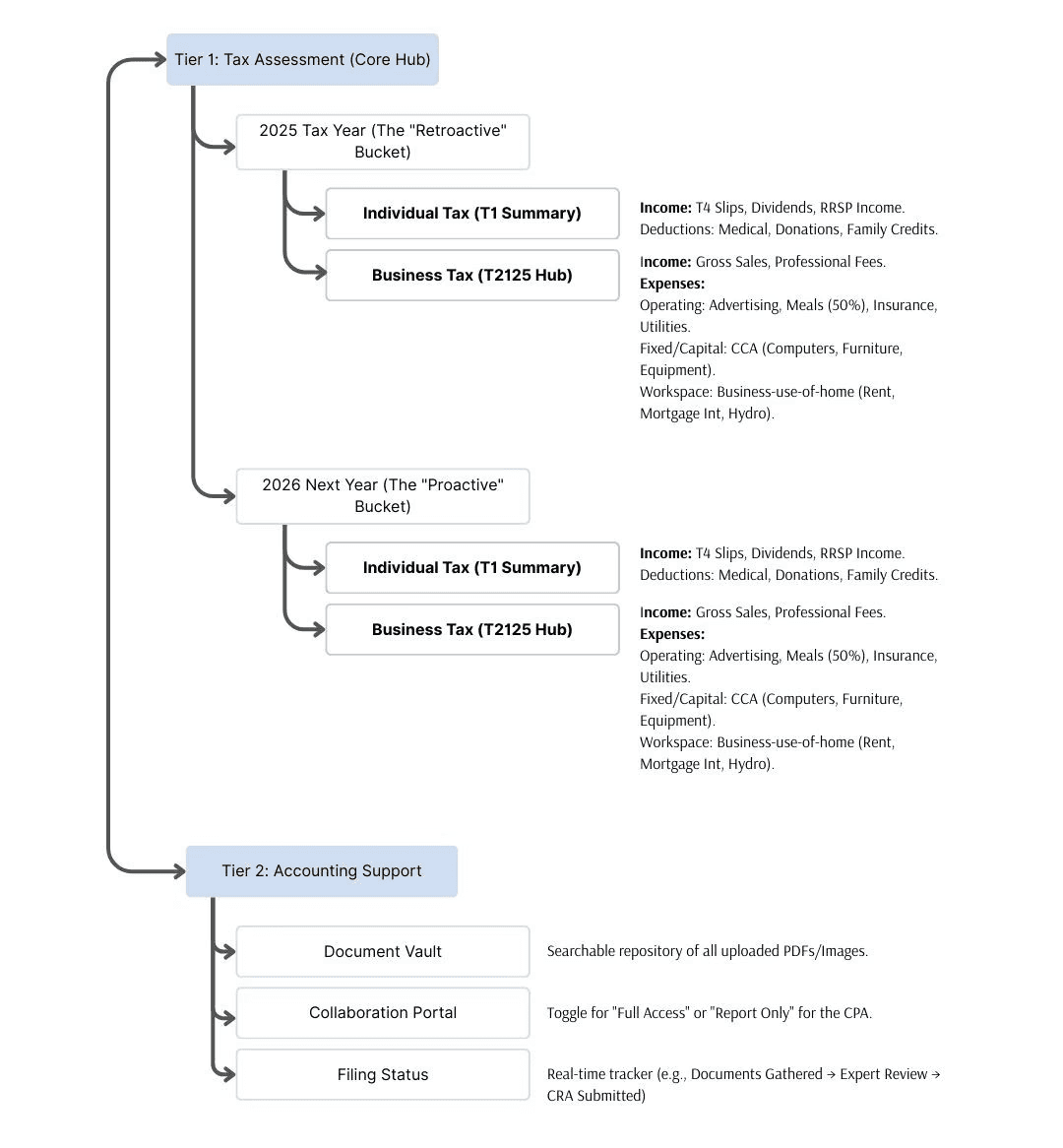
The Design Process: Logic-First Prototyping
Instead of traditional static design tools, I leveraged Google AI Studio to build a functional engine. This allowed for the testing of real tax math and OCR (Optical Character Recognition) logic that Figma cannot simulate.
The Structural Prompt
I initially provided a comprehensive IA prompt to Gemini, but found the LLM struggled to maintain the nested hierarchy of Canadian tax forms in a single go.
Modular Mini-Prompts
I pivoted to a "Modular Prompting" strategy, using specific mini-prompts to build out each IA section (e.g., a dedicated prompt for T2125 expense mapping).
Logical Validation
By deploying the code to a Cloud environment, I verified that the Quick Upload feature could successfully read a receipt date and route it to the correct IA branch (2025 vs. 2026) without user intervention.
Stakeholder Showcase
This resulted in a functional prototype where stakeholders could upload real PDFs and see the IA categorize them in real-time, proving the solution's technical feasibility.
The Result: A "Code-as-Canvas" approach that ensures the design system is as robust as the tax logic it supports.
The Core Engine: Strategic Features for the Modern Solopreneur
In the Design Phase, these four features represent the functional heart of PocketTax. They were specifically architected in Google AI Studio to solve Sam’s "Administrative Trap" by automating data entry and ensuring CRA compliance.
The Proactive Engine: Quick Upload & 2026 Tracking
This feature eliminates the "shoebox effect" by allowing Sam to instantly snap photos or upload PDFs of receipts and invoices. The AI-driven OCR engine doesn't just store the image; it contextually routes the data into the 2026 Proactive Bucket.
By extracting dates, vendors, and GST/HST amounts automatically, the platform calculates real-time progress toward the $30,000 HST threshold and sets aside tax portions into a "virtual vault". This proactive approach ensures that by the time Sam reaches the next fiscal year, 90% of their bookkeeping is already complete and audit-ready.
The Compliance Hub: 2025 Status & T2125 Mapping
The Compliance Hub provides a real-time status of the current tax year, organizing every uploaded document into the specific categories required by the CRA’s T2125 form. Income is tracked against professional fees, while expenses are automatically mapped to lines like 8523 (Meals) or 8810 (Office Supplies).
For complex claims like "Business-use-of-home," the AI prompts Sam for missing utility or rent receipts, ensuring they maximize their legal deductions while maintaining a clear digital audit trail. This turns a massive year-end project into a series of small, manageable digital interactions.
The Expert Handshake: Certified CPA Collaboration
The Expert Section provides Sam with a "Safety Net" by connecting their digital records directly to a human accounting professional. Through a white-labeled portal, Sam can grant their accountant either "Full Access" to edit entries or "Report-Only" access to verify the final tax assessment.
This feature allows for a seamless hand-off where the accountant can use the AI-categorized data to perform a final audit and submit the return via EFILE. It provides Sam with the confidence of professional validation without the high cost of traditional, year-round manual bookkeeping.
The AI Tax Navigator: Real-Time Contextual Guidance
The AI Navigator acts as a persistent, context-aware co-pilot that follows Sam across every page of the platform to translate complex CRA regulations into plain English. It proactively assists by identifying missing documents, suggesting appropriate tax categories for new uploads, and providing instant reminders for upcoming deadlines like the April 30th payment cutoff.
Beyond automated help, the navigator serves as the gateway to human support, allowing Sam to escalate complex questions to a certified accountant while ensuring their financial data remains organized and audit-ready.
Reflection

01
On Fidelity and the "Invisible" Wireframe
In today's "vibe coding" era, many startups are tempted to skip the traditional design process, moving directly from a prompt to high-fidelity code. In this project, I intentionally bypassed the static wireframing phase to work directly within Google AI Studio.
What I discovered is that wireframing hasn't truly disappeared; it has simply merged with the development phase. Each "mini-prompt" I used to refine the Information Architecture (IA) acted as a functional iteration of a wireframe. By comparing this to my previous Art Auction App—where a traditional wireframe led to a successful result in just two tries—I realized that vibe coding requires a significantly higher volume of prompts to reach the same level of architectural precision. The high-fidelity output often masks structural gaps that only a rigorous, modular prompting strategy can fix.
02
Scaling Down to Scale Up: The Big Picture Trap
Early in this project, I attempted a broad SaaS approach, prompting the entire ecosystem (Solopreneur, Accounting Firm, and Provider) at once. While the resulting screens were visually impressive, the AI struggled to maintain the logical "connective tissue" between these distinct user types. The user experience felt fragmented because AI, at its current state, often lacks the "Big Picture" perspective required for complex, multi-sided platforms.
I made the strategic decision to pivot and focus exclusively on the Solopreneur (Sam Clark). By narrowing the scope to the core problem—eliminating tax-season panic through year-round record management—I was able to ensure the AI focused on the specific logic Sam needed: T2125 mapping, GST/HST tracking, and the "Quick Upload" engine. This taught me that as a project grows in complexity, the designer’s role shifts from "creator" to "architect," ensuring the AI doesn't lose sight of the user's ultimate goal amidst the technical components.
Featured Projects
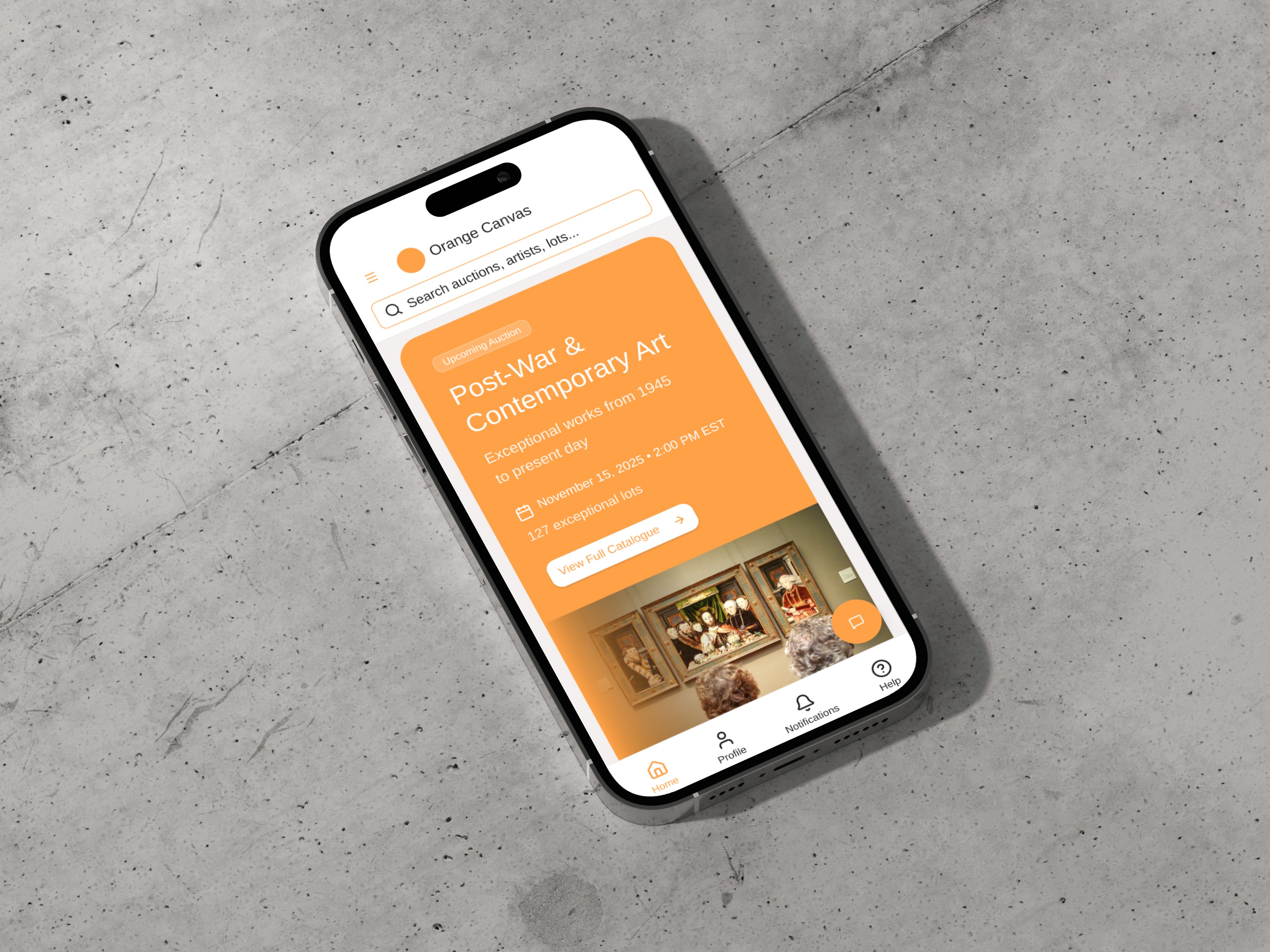
Designed and prototyped a responsive, mobile-first Art Auction app, empowering art buyers to efficiently manage clients and track real-time bidding and winning lots.
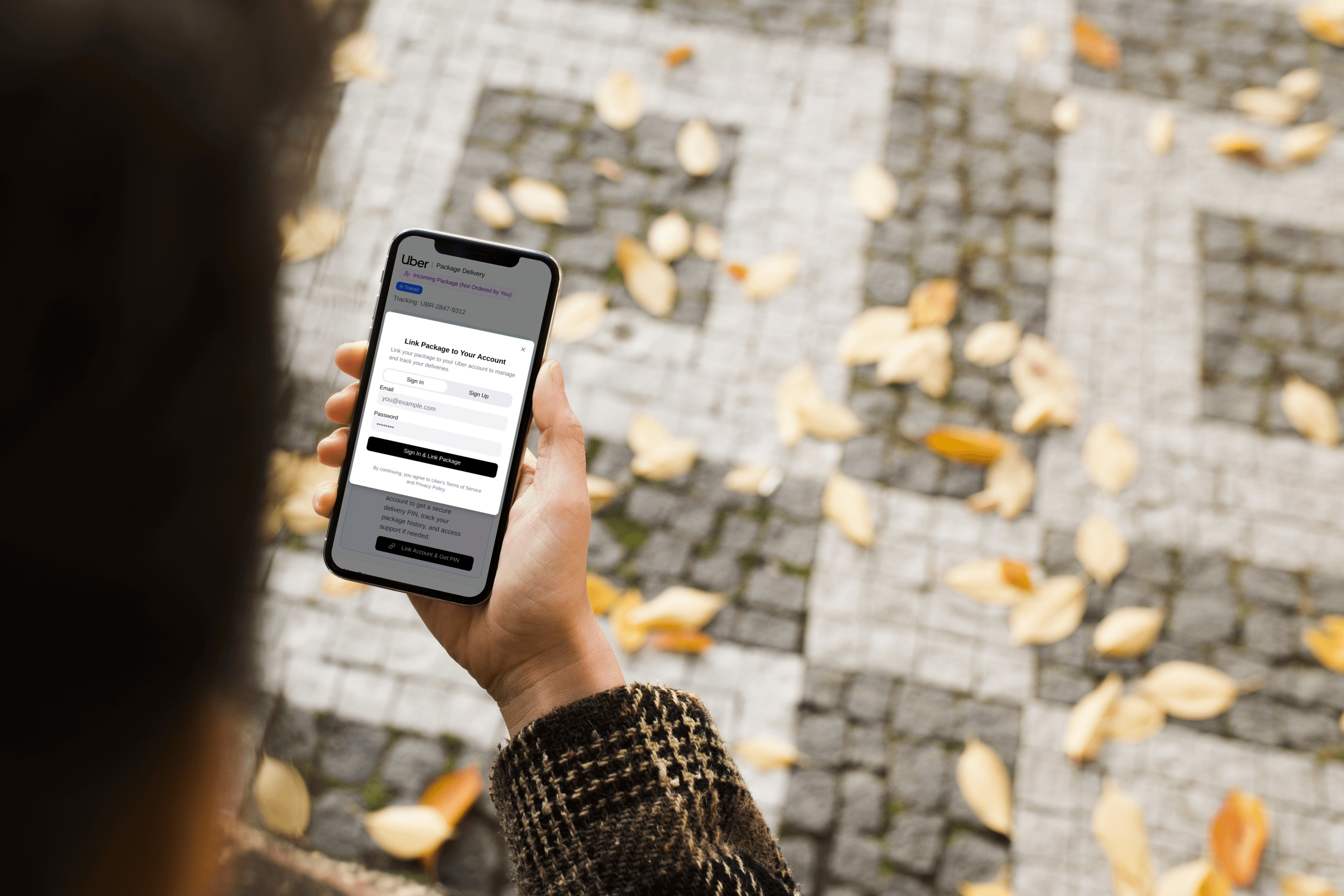
Uber -Improving Package Delivery Security
Designing a system that introduces recipient account linking and a mandatory PIN to ensure delivery confirmation and enable direct follow-up support for package receivers.
AI Role-Playing for Usability Testing: A Budget-Conscious Exploration
To address budget constraints and explore innovative applications of AI in usability testing—moving beyond current uses like form creation or summary generation—I implemented an innovative AI role-playing method using Gemini.

Reach Out with Your Questions!
If you have any questions, please feel free to contact me.
Back to Top